GALERIA FOTOGRAFICA

Todas las fotos de familia, amigos y eventos realizados por los grupos al cual pertenesco estan en este segmento...

jueves, 4 de junio de 2020

April 2019 Connector

OWASP
Connector
April 2019

COMMUNICATIONS


Letter from the Vice Chairman:

Dear OWASP Community,

Over the past number of months the Board of Directors has been working on the feedback received from the community. This feedback aligned with our key strategic goals for the year. One of our key goals was to further strengthen the "P" in OWASP. To this end we have been working with the Open Security Summit to put more of a focus on improving project development and growth and hope to enable projects through events such as this.

Another goal is to strengthen our student outreach. One idea I had was to work with colleges all over the world to support our projects development as part of their internships. I wonder if there would be anyone in the community to assist in this effort by creating a Committee under the revised Committee 2.0 model - https://www.owasp.org/index.php/Governance/OWASP_Committees. To simplify things I have added a quick start guide at the beginning of the document.

Diversity is something that we hold dear to our hearts. There are a number of people in our community that have driven this initiative to enable OWASP to be a more diverse community, without naming any names, we would like to thank them and encourage more of those in and outside of the OWASP community to get involved and help OWASP grow.

Last but not least, planning for our global conferences is well under way with OWASP Global AppSec Tel Aviv coming up at the end of May – one small ask is that everyone share information on this conference in your communities,https://telaviv.appsecglobal.org.

Thanks for all your hard work.

Owen Pendlebury
OWASP Vice Chairman
 

OWASP FOUNDATION UPDATE FROM INTERIM EXECUTIVE DIRECTOR:

For these first few months I have been focused on business operations retooling. As you know, Mailman was recently retired. There is now an online static archive of historical messages. Our goal before Q3 is to have most of our tools on managed, trusted hosted services.

We have increased our use of JIRA to manage inbound requests and last month the team closed 98.6% of service tickets within their prescribed SLA. In January it was 20.4%. This is a very big accomplishment and demonstrates our progress on this work effort. There have also been a number of back office changes that most members won't notice, but we're focused on stronger business continuity for the long term.

In addition to all our upcoming events, the staff along with some members of the community are actively prototyping how we will completely update the website this summer. This effort will not be simply cosmetic, it will be a foundational change in how we manage and publish content that we believe will better connect with our community - and more importantly help us grow. Expect more updates on this in the coming months.

Be safe out there,

Mike McCamon
OWASP, Interim Executive Director
Have you Registered yet? 
Sponsorship for Global AppSec Tel Aviv is still available.  
Global AppSec DC September 9-13, 2019
submit to the Call for Papers and Call for Training

EVENTS 

You may also be interested in one of our other affiliated events:

REGIONAL AND LOCAL EVENTS

Event Date Location
Latam Tour 2019 Starting April 4, 2019 Latin America
OWASP Portland Training Day September 25, 2019 Portland, OR
LASCON X October 24-25,2019 Austin, TX
OWASP AppSec Day 2019 Oct 30 - Nov 1, 2019 Melbourne, Australia

PARTNER AND PROMOTIONAL EVENTS
Event Date Location
Cyber Security and Cloud Expo Global April 25-26, 2019 London
IoT Tech Expo Global April 25-26, 2019 London
Internet of Things World May 13-16, 2019 Santa Clara Conventional Center, CA
Hack in Paris 2019 June 16-20, 2019 Paris
Cyber Security and Cloud Expo Europe June 19-20, 2019 Amsterdam
IoT Tech Expo Europe June 19-20, 2019 Amsterdam
it-sa-IT Security Expo and Congress October 8-10, 2019 Germany

PROJECTS

The Project Showcase at Global AppSec Tel Aviv has received a great deal of interest.  Anyone attending will be in for a steady stream of information on OWASP Projects.  The following projects are proposed for the showcase (the actual schedule has not been developed so the order is not indicative of time slots):

Project Presenter(s)
Glue Tool Omer Levi Hevroni
Internet of Things Aaron Guzman
Embedded AppSec Aaron Guzman
Software Assurance Maturity Model (SAMM) John DiLeo
API Security Erez Yalon, Inon Shkedy
Mod Security Core Rule Set Christian Folini, Tin Zaw
Automated Threats Tin Zaw
Application Security Curriculum Project John DiLeo
Defect Dojo Aaron Weaver
Web Honeypot Project Adrian Winckles
Damned Vulnerable Serverless Application Tal Melamed

The scheduled for project reviews at Global AppSec Tel Aviv are the following:
 
Project Review Level Leaders
Snakes and Ladders Lab Colin Watson, Katy Anton
Amass Lab Jeff Foley
Attack Surface Detector Lab Ken Prole
SecureTea Tool Lab Ade Yoseman Putra, Bambang Rahmadi KP, Rejah Rehim.AA
Serverless-Goat Lab Ory Segal
Cheat Sheet Series Flagship Dominique Righetto, Jim Manico
Mobile Security Testing Guide Flagship Sven Schleier, Jeroen Willemsen


If you are attending Global AppSec Tel Aviv 2019 and can participate in the project reviews (to be held on Monday and Tuesday prior to the conference, schedule pending), then please send an email to project-reviews@owasp.org

COMMUNITY

New OWASP Chapters
Amaravathi, India
Belo Horizonte, Brazil
Bhopal, India
Cusco, Peru
Dindigul, India
Kharkiv, Ukraine 
Meerut, India
Rio de Janeiro, Brazil
San Jacinto College, Texas
San Pedro Sula, Honduras
Seoul, Korea
West Delhi, Delhi

MEMBERSHIP

 
We welcome the following Contributor Corporate Members

Premier Corporate Members

Contributor Corporate Members
Join us
Donate
Our mailing address is:
OWASP Foundation 
1200-C Agora Drive, # 232
Bel Air, MD 21014  
Contact Us
Unsubscribe


This email was sent to *|EMAIL|*
why did I get this?    unsubscribe from this list    update subscription preferences
*|LIST:ADDRESSLINE|*

Read more...

miércoles, 3 de junio de 2020

DOS (Denial Of Service) Attack Tutorial Ping Of Death ;DDOS

What is DoS Attack?

DOS is an attack used to deny legitimate users access to a resource such as accessing a website, network, emails, etc. or making it extremely slow. DoS is the acronym for Denial of Service. This type of attack is usually implemented by hitting the target resource such as a web server with too many requests at the same time. This results in the server failing to respond to all the requests. The effect of this can either be crashing the servers or slowing them down.


Cutting off some business from the internet can lead to significant loss of business or money. The internet and computer networks power a lot of businesses. Some organizations such as payment gateways, e-commerce sites entirely depend on the internet to do business.

In this tutorial, we will introduce you to what denial of service attack is, how it is performed and how you can protect against such attacks.

Topics covered in this tutorial

Types of Dos Attacks

There are two types of Dos attacks namely;
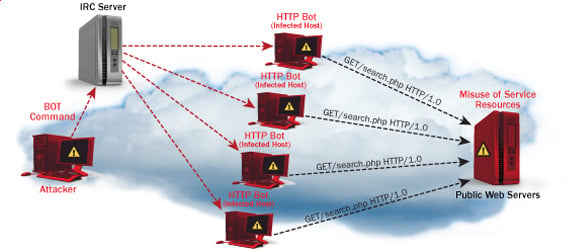
  • DoS– this type of attack is performed by a single host
  • Distributed DoS– this type of attack is performed by a number of compromised machines that all target the same victim. It floods the network with data packets.

Ultimate guide to DoS(Denial of Service) Attacks

How DoS attacks work

Let's look at how DoS attacks are performed and the techniques used. We will look at five common types of attacks.

Ping of Death

The ping command is usually used to test the availability of a network resource. It works by sending small data packets to the network resource. The ping of death takes advantage of this and sends data packets above the maximum limit (65,536 bytes) that TCP/IP allows. TCP/IP fragmentation breaks the packets into small chunks that are sent to the server. Since the sent data packages are larger than what the server can handle, the server can freeze, reboot, or crash.

Smurf

This type of attack uses large amounts of Internet Control Message Protocol (ICMP) ping traffic target at an Internet Broadcast Address. The reply IP address is spoofed to that of the intended victim. All the replies are sent to the victim instead of the IP used for the pings. Since a single Internet Broadcast Address can support a maximum of 255 hosts, a smurf attack amplifies a single ping 255 times.  The effect of this is slowing down the network to a point where it is impossible to use it.

Buffer overflow

A buffer is a temporal storage location in RAM that is used to hold data so that the CPU can manipulate it before writing it back to the disc. Buffers have a size limit. This type of attack loads the buffer with more data that it can hold. This causes the buffer to overflow and corrupt the data it holds. An example of a buffer overflow is sending emails with file names that have 256 characters.

Teardrop

This type of attack uses larger data packets. TCP/IP breaks them into fragments that are assembled on the receiving host. The attacker manipulates the packets as they are sent so that they overlap each other. This can cause the intended victim to crash as it tries to re-assemble the packets.

SYN attack

SYN is a short form for Synchronize. This type of attack takes advantage of the three-way handshake to establish communication using TCP. SYN attack works by flooding the victim with incomplete SYN messages. This causes the victim machine to allocate memory resources that are never used and deny access to legitimate users.

DoS attack tools

The following are some of the tools that can be used to perform DoS attacks.

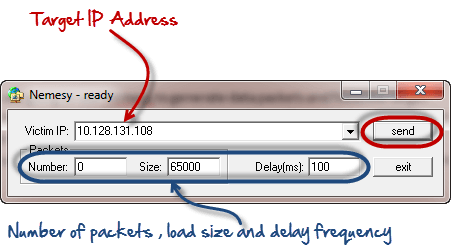
  • Nemesy– this tool can be used to generate random packets. It works on windows. This tool can be downloaded from http://packetstormsecurity.com/files/25599/nemesy13.zip.html . Due to the nature of the program, if you have an antivirus, it will most likely be detected as a virus.
  • Land and LaTierra– this tool can be used for IP spoofing and opening TCP connections
  • Blast– this tool can be downloaded from http://www.opencomm.co.uk/products/blast/features.php
  • Panther- this tool can be used to flood a victim's network with UDP packets.
  • Botnets– these are multitudes of compromised computers on the Internet that can be used to perform a distributed denial of service attack.

DoS Protection: Prevent an attack

An organization can adopt the following policy to protect itself against Denial of Service attacks.

  • Attacks such as SYN flooding take advantage of bugs in the operating system. Installing security patches can help reduce the chances of such attacks.
  • Intrusion detection systems can also be used to identify and even stop illegal activities
  • Firewalls can be used to stop simple DoS attacks by blocking all traffic coming from an attacker by identifying his IP.
  • Routers can be configured via the Access Control List to limit access to the network and drop suspected illegal traffic.

Hacking Activity: Ping of Death

We will assume you are using Windows for this exercise. We will also assume that you have at least two computers that are on the same network. DOS attacks are illegal on networks that you are not authorized to do so. This is why you will need to setup your own network for this exercise.

Open the command prompt on the target computer

Enter the command ipconfig. You will get results similar to the ones shown below

Ultimate guide to DoS(Denial of Service) Attacks

For this example, we are using Mobile Broadband connection details. Take note of the IP address. Note: for this example to be more effective, and you must use a LAN network.

 Switch to the computer that you want to use for the attack and open the command prompt

We will ping our victim computer with infinite data packets of 65500

Enter the following command

ping 10.128.131.108 –t |65500

HERE,

  • "ping" sends the data packets to the victim
  • "10.128.131.108" is the IP address of the victim
  • "-t" means the data packets should be sent until the program is stopped
  • "-l" specifies the data load to be sent to the victim

You will get results similar to the ones shown below

Ultimate guide to DoS(Denial of Service) Attacks

Flooding the target computer with data packets doesn't have much effect on the victim. In order for the attack to be more effective, you should attack the target computer with pings from more than one computer.

The above attack can be used to attacker routers, web servers etc.

If you want to see the effects of the attack on the target computer, you can open the task manager and view the network activities.

  • Right click on the taskbar
  • Select start task manager
  • Click on the network tab
  • You will get results similar to the following

Ultimate guide to DoS(Denial of Service) Attacks

If the attack is successful, you should be able to see increased network activities.


Hacking Activity: Launch a DOS attack

In this practical scenario, we are going to use Nemesy to generate data packets and flood the target computer, router or server.

As stated above, Nemesy will be detected as an illegal program by your anti-virus. You will have to disable the anti-virus for this exercise.
Ultimate guide to DoS(Denial of Service) Attacks

Enter the target IP address, in this example; we have used the target IP we used in the above example.

HERE,

  • 0 as the number of packets means infinity. You can set it to the desired number if you do not want to send, infinity data packets
  • The size field specifies the data bytes to be sent and the delay specifies the time interval in milliseconds.


Click on send button

You should be able to see the following results

Ultimate guide to DoS(Denial of Service) Attacks

The title bar will show you the number of packets sent

Click on halt button to stop the program from sending data packets.

You can monitor the task manager of the target computer to see the network activities.

Summary

  • A denial of service attack's intent is to deny legitimate users access to a resource such as a network, server etc.
  • There are two types of attacks, denial of service and distributed denial of service.
  • A denial of service attack can be carried out using SYN Flooding, Ping of Death, Teardrop, Smurf or buffer overflow
  • Security patches for operating systems, router configuration, firewalls and intrusion detection systems can be used to protect against denial of service attacks.
@EVERYTHING NT

More articles


  1. Hacker Prank
  2. Pentesterlab
  3. Pentest Os
  4. Hacking Quotes
  5. Pentest Basics
  6. Hacker Anonymous
  7. Pentest Ftp
  8. Pentest Cheat Sheet
  9. Pentest News
  10. Pentest Gear
  11. Pentestmonkey Cheat Sheet
  12. Pentest Certification
  13. Hacker
  14. Pentest Uk
  15. Hacking Box
  16. Pentest Certification

Read more...

How To Crack A Password

What is Password Cracking?

Password cracking is the process of attempting to gain Unauthorized access to restricted systems using common passwords or algorithms that guess passwords. In other words, it's an art of obtaining the correct password that gives access to a system protected by an authentication method.

Password cracking employs a number of techniques to achieve its goals. The cracking process can involve either comparing stored passwords against word list or use algorithms to generate passwords that match

How to crack password of an Application

In this Tutorial, we will introduce you to the common password cracking techniques and the countermeasures you can implement to protect systems against such attacks.

Topics covered in this tutorial

What is password strength?

Password strength is the measure of a password's efficiency to resist password cracking attacks. The strength of a password is determined by;

  • Length: the number of characters the password contains.
  • Complexity: does it use a combination of letters, numbers, and symbol?
  • Unpredictability: is it something that can be guessed easily by an attacker?

Let's now look at a practical example. We will use three passwords namely

1.  password

2.  password1

3.  #password1$

 For this example, we will use the password strength indicator of Cpanel when creating passwords. The images below show the password strengths of each of the above-listed passwords.

How to crack password of an Application

Note: the password used is password the strength is 1, and it's very weak.

How to crack password of an Application

Note: the password used is password1 the strength is 28, and it's still weak.

How to crack password of an Application

Note: The password used is #password1$ the strength is 60 and it's strong.

The higher the strength number, better the password.

Let's suppose that we have to store our above passwords using md5 encryption. We will use an online md5 hash generator to convert our passwords into md5 hashes.

 The table below shows the password hashes

PasswordMD5 HashCpanel Strength Indicator
password5f4dcc3b5aa765d61d8327deb882cf991
password17c6a180b36896a0a8c02787eeafb0e4c28
#password1$29e08fb7103c327d68327f23d8d9256c60


 We will now use http://www.md5this.com/ to crack the above hashes. The images below show the password cracking results for the above passwords.


How to crack password of an Application

How to crack password of an Application

How to crack password of an Application

As you can see from the above results, we managed to crack the first and second passwords that had lower strength numbers. We didn't manage to crack the third password which was longer, complex and unpredictable. It had a higher strength number.

Password cracking techniques

There are a number of techniques that can be used to crack passwords. We will describe the most commonly used ones below;

  • Dictionary attack– This method involves the use of a wordlist to compare against user passwords.
  • Brute force attack– This method is similar to the dictionary attack. Brute force attacks use algorithms that combine alpha-numeric characters and symbols to come up with passwords for the attack. For example, a password of the value "password" can also be tried as p@$$word using the brute force attack.
  • Rainbow table attack– This method uses pre-computed hashes. Let's assume that we have a database which stores passwords as md5 hashes. We can create another database that has md5 hashes of commonly used passwords. We can then compare the password hash we have against the stored hashes in the database. If a match is found, then we have the password.
  • Guess– As the name suggests, this method involves guessing. Passwords such as qwerty, password, admin, etc. are commonly used or set as default passwords. If they have not been changed or if the user is careless when selecting passwords, then they can be easily compromised.
  • Spidering– Most organizations use passwords that contain company information. This information can be found on company websites, social media such as facebook, twitter, etc. Spidering gathers information from these sources to come up with word lists. The word list is then used to perform dictionary and brute force attacks.

Spidering sample dictionary attack wordlist

1976 <founder birth year>

smith jones <founder name>

acme <company name/initials>

built|to|last <words in company vision/mission>

golfing|chess|soccer <founders hobbies

Password cracking tool

These are software programs that are used to crack user passwords. We already looked at a similar tool in the above example on password strengths. The website www.md5this.com uses a rainbow table to crack passwords. We will now look at some of the commonly used tools

John the Ripper

John the Ripper uses the command prompt to crack passwords. This makes it suitable for advanced users who are comfortable working with commands. It uses to wordlist to crack passwords. The program is free, but the word list has to be bought. It has free alternative word lists that you can use. Visit the product website http://www.openwall.com/john/ for more information and how to use it.

Cain & Abel

Cain & Abel runs on windows. It is used to recover passwords for user accounts, recovery of Microsoft Access passwords; networking sniffing, etc. Unlike John the Ripper, Cain & Abel uses a graphic user interface. It is very common among newbies and script kiddies because of its simplicity of use. Visit the product website http://www.softpedia.com/get/Security/Decrypting-Decoding/Cain-and-Abel.shtml for more information and how to use it.

Ophcrack

Ophcrack is a cross-platform Windows password cracker that uses rainbow tables to crack passwords. It runs on Windows, Linux and Mac OS. It also has a module for brute force attacks among other features. Visit the product website http://ophcrack.sourceforge.net/  for more information and how to use it.

Password Cracking Counter Measures

  • An organization can use the following methods to reduce the chances of the passwords been cracked
  • Avoid short and easily predicable passwords
  • Avoid using passwords with predictable patterns such as 11552266.
  • Passwords stored in the database must always be encrypted. For md5 encryptions, its better to salt the password hashes before storing them. Salting involves adding some word to the provided password before creating the hash.
  • Most registration systems have password strength indicators, organizations must adopt policies that favor high password strength numbers.

Hacking Activity: Hack Now!

In this practical scenario, we are going to crack Windows account with a simple password. Windows uses NTLM hashes to encrypt passwords. We will use the NTLM cracker tool in Cain and Abel to do that.

Cain and Abel cracker can be used to crack passwords using;

  • Dictionary attack
  • Brute force
  • Cryptanalysis

We will use the dictionary attack in this example. You will need to download the dictionary attack wordlist here 10k-Most-Common.zip

For this demonstration, we have created an account called Accounts with the password qwerty on Windows 7.

How to crack password of an Application

Password cracking steps

  • Open Cain and Abel, you will get the following main screen

How to crack password of an Application

  • Make sure the cracker tab is selected as shown above
  • Click on the Add button on the toolbar.

How to crack password of an Application

  • The following dialog window will appear

How to crack password of an Application

  • The local user accounts will be displayed as follows. Note the results shown will be of the user accounts on your local machine.

How to crack password of an Application

  • Right click on the account you want to crack. For this tutorial, we will use Accounts as the user account.

How to crack password of an Application

  • The following screen will appear

How to crack password of an Application

  • Right click on the dictionary section and select Add to list menu as shown above
  • Browse to the 10k most common.txt file that you just downloaded

How to crack password of an Application

  • Click on start button
  • If the user used a simple password like qwerty, then you should be able to get the following results.

How to crack password of an Application

  • Note: the time taken to crack the password depends on the password strength, complexity and processing power of your machine.
  • If the password is not cracked using a dictionary attack, you can try brute force or cryptanalysis attacks.

Summary

  • Password cracking is the art of recovering stored or transmitted passwords.
  • Password strength is determined by the length, complexity, and unpredictability of a password value.
  • Common password techniques include dictionary attacks, brute force, rainbow tables, spidering and cracking.
  • Password cracking tools simplify the process of cracking passwords.
@EVERYTHING NT
More articles

Read more...

  © Blogger templates ProBlogger Template by Ourblogtemplates.com 2008

Back to TOP
